
Table of Contents
FART Scene File Syntax
This document describes the syntax of the scene description files used by the FART Raytracer.
Scene description files are represented in an ASCII-based, hierarchical language.
Example Scene Description File
First, a simple example:
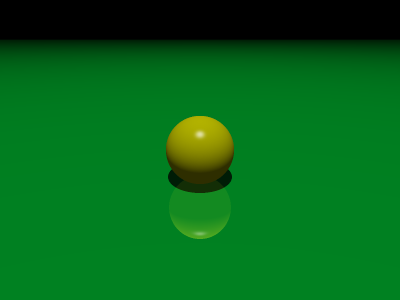
scene {
    options {
        width 400
        height 300
    }
    camera {
        position <5, -5, 4>
        look_at <0, 0, 1>
    }
    light {
        position <10, -10, 50>
    }
    plane {
        position <0, 0, 1>, 0
        material {
            color <0, 1, 0.2>
            reflectance 0.4
        }
    }
    sphere {
        radius 1
        translate <0, 0, 1>
        material {
            color <1, 1, 0>
        }
    }
}
Scene Loading Phases
Scene description files are loaded in three phases.
Phase 1 : Initial Parsing
First, the scene file is parsed and a tree of nodes is created.
Basic syntax errors are caught at this point, but placement of nodes is not (such as a “plane” containing a “radius”, or such).
for(), while(), if(), and other scripting nodes are simply stored as regular nodes in the tree.
Phase 2 : Script Execution
After the parse tree has been made, it is traversed in order, and scripting nodes are executed. The result of this phase is a new node tree devoid of any scripting nodes, and with exactly one object node for every object in the scene.
Phase 3 : Scene Construction
The node tree produced in phase 2 is traversed (not necessarily in order) in order to build the scene objects which will be used while rendering the scene.
Scene Description File Elements
Identifiers
In various elements, identifiers are required, for example, when giving a name to reusable shapes or materials for easy reference later.
The format of an identifier is:
IDENTIFIER ::= [a-zA-Z_][a-zA-Z_0-9]*
Object Elements
scene
Every scene file must have exactly one scene node, and it must be the top-level node in the file.
Syntax:
scene {
  scene_items
}
scene_items can be any of:
- Any scripting element
- Any transform block
- Any shape element
options
Syntax:
options {
  options_items
}
options_items can be any of:
widthn - set the rendered image width to n (default 800).heightn - set the rendered image height to n (default 600).multisamplen - set the multisample level to n (default 3). The number of samples per pixel is given by n^2.ambient_occlusionn - set the ambient occlusion level to n (default 0, inactive). Level can be 0 (inactive) through 9 (slow).max_depthn - set the maximum depth that ray recursion is allowed to hit (default 10).exposuref - set the exposure level to f (default 1.0).ambientv - set the global ambient light to v (default <0.2, 0.2, 0.2>).
Most of these options can be overridden from the command line. See Executing FART.
camera
Syntax:
camera {
  camera_items
}
camera_items can be any of:
positionv - set eye point of camera to v (default <0, 0, 0>).look_atv - set focal point of camera to v (default <0, 1, 0>).upv - set “up” vector for camera to v (default <0, 0, 1>).vfovf - set the vertical field-of-view to f (default 60.0).
light
Syntax:
light {
  light_items
}
light_items can be any of:
positionv - set light position to v (default <0, 0, 0>).diffusev - set light diffuse color to v (default <1, 1, 1>).specularv - set light specular color to v (default <1, 1, 1>).colorv - set light diffuse and specular color to v (default <1, 1, 1>).radiusf - set light radius to f (default 1.0). This is only used withjitter> 1.jittern - set light jitter level to n (default 1). This is used to effect soft shadows. The higher the jitter level, the more points are used to approximate the soft shadow, and the longer the render takes.
Scripting Elements
Variables
Syntax:
VARIABLE ::= $[a-zA-Z_][a-zA-Z_0-9]*
Variables, which are only used during the execution phase, are differentiated from identifiers by a preceding “$” symbol.
Variables can be declared by simply assigning to them:
$x = 42
If a variable $x exists in an outer scope but a newly scoped $x is desired, one can be created with the local keyword:
local $x
or
local $x = 42
Expressions
Operators:
+(plus)-(minus)*(times)/(divide)%(modulus)=(assignment)==(equality comparison)!=(not equals)!(boolean NOT)&&(boolean AND)||(boolean OR)
The operators were designed to work like they work in C. The arguments to modulus are converted to integers.
for loop
for (initial_expression; test_expression; post_expression)
{
  for_items
}
The for loop works like in C. Pretty much anything can go in for_items.
while loop
while (test_expression)
{
  while_items
}
Once again, pretty much any element can appear inside while_items.
if
if (expression)
{
  elements
}
elsif (expression)
{
  elements
}
else
{
  elements
}
Works like in C.
Built-in Functions
Function calls look like they do in C. Here's how to call built-in functions:
function_call ::= IDENTIFIER '(' parameters ')'

parameters ::=
parameters ::= expression more_parameters

more_parameters ::=
more_parameters ::= COMMA expression more_parameters
Here are the built-in functions supported:
cos(x)- return cosine ofxsin(x)- return sine ofxabs(x)- return absolute value ofxsqrt(x)- return the square root ofx